
remove Claude Design video player panel
How to Remove the Claude Design Video Player Panel
Seeing a player bar at the bottom of your rendered video? Learn why it comes from the Claude Design artifact and how to fix it before re-rendering.
If your rendered MP4 shows a video player panel at the bottom, the problem usually started before the render. Claude Design sometimes adds playback controls directly into the artifact, and those controls become part of the visual scene.
Claude Video Export renders what is inside the artifact. It does not know which pixels are "real design" and which pixels are Claude's added player UI.
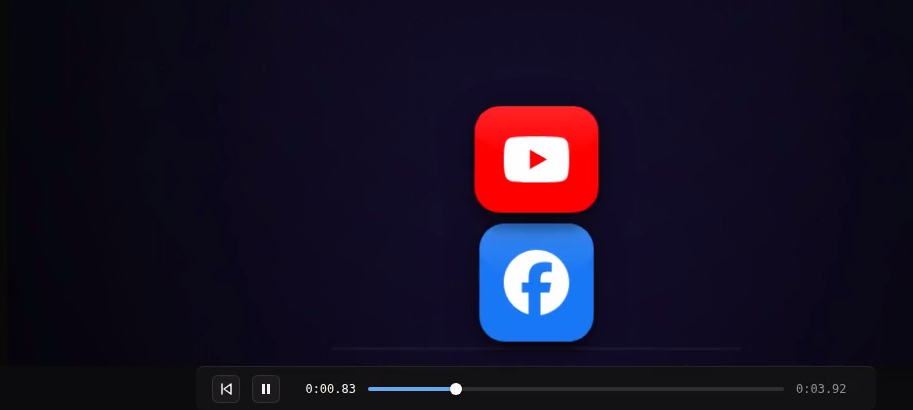
What the problem looks like
The rendered video may show one or more of these elements at the bottom:
- A play or pause button
- A scrubber or timeline
- Playback controls
- A dark or light control bar
- A panel that looks like a video preview interface
This is frustrating because the MP4 itself rendered correctly. The unwanted panel was already present in the Claude Design output, so it was captured like any other visible element.
Why this is not a CVE problem
CVE is a renderer. It opens your Claude Design export, captures the frames, and encodes them into an MP4.
If the Claude Design artifact contains a player panel, CVE will include that panel in the video. Removing it automatically after rendering would mean guessing which parts of your design are accidental UI and which parts are intentional. That would be unreliable and could damage legitimate designs.
The correct fix is to remove the player panel in Claude Design, regenerate the artifact, and then render the clean version again in CVE.
Copy this prompt into Claude Design
Use this prompt only for this specific problem:
Please remove the video player panel from the bottom of this Claude Design artifact. Remove any play button, timeline, scrubber, playback controls, or bottom control bar, but keep the animation visuals and timing unchanged.
This prompt is intentionally narrow. It tells Claude to remove the playback UI without redesigning the animation or changing the timing.
How to regenerate and re-render the video
- Open the Claude Design conversation that created your animation.
- Paste the prompt above.
- Ask Claude to update the artifact.
- Confirm the bottom player panel is no longer visible in the design.
- Download the updated Claude Design export.
- Upload the new export to claudevideoexport.com.
- Render the video again and download the new MP4.
If the panel still appears, repeat the prompt and be more direct: tell Claude that the final artifact must not include any video controls, timeline, scrubber, or playback UI.
Quick check before rendering again
Before you spend time rendering, preview the updated artifact in Claude Design and look at the bottom edge carefully. If you can still see controls in Claude, they will probably appear in the MP4 too.
Once the Claude artifact is clean, CVE can render a clean video from it.
FAQ
Why is there a video player panel in my rendered video?
Claude Design added the player controls inside the artifact itself, so the renderer captured them as part of the visual design.
Can Claude Video Export remove the panel after rendering?
No. CVE renders the source exactly as provided. The panel has to be removed in Claude Design before rendering again.
Do I need to rebuild the whole animation?
No. Ask Claude Design to remove only the playback controls while keeping the animation visuals and timing unchanged.